Guides
Agent-connector beginner guide#
This page is for developers who are new to agent-connector and need the MCP concepts underneath it. Start with the protocol roles, then learn how agent-connector maps servers, hooks, HUD/statusline, actions, commands, skills, subagents, and memory into the host CLIs you target.
What MCP is
MCP is a standard way for an agent host to talk to external capability providers. Your server exposes tools, resources, or prompts; the host decides when to show them to the model and when a user must approve a call. The protocol is the boundary between those two sides.For the canonical protocol reference, keep the official MCP docs open while you build. This page is the short practical path for a first implementation.
Reference refresh: current MCP docs
This guide was refreshed against the official MCP docs for protocol version2025-11-25 and the npm-published @modelcontextprotocol/sdk 1.29.0. For current protocol details, keep the tools spec, transports spec, and MCP Inspector open while you build.What this Guides track teaches
The Guides track is the concept bridge. It explains MCP basics, the agent-connector distribution layer, and what each connector surface does inside a host CLI: what the model can call, what the host triggers, what the user invokes, what the host UI renders, and what files the host loads as standing context.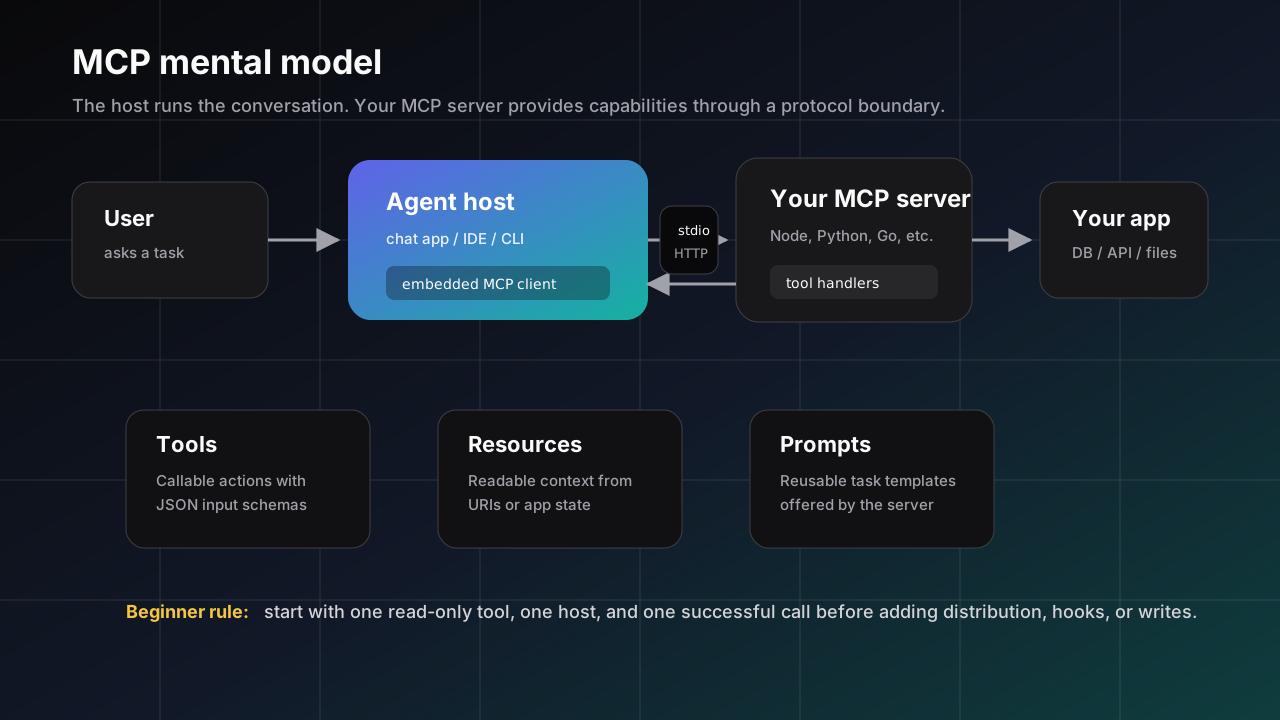
Architecture map: who owns what?#
Beginners often confuse the model, the host, and the MCP server. Keep them separate. The model decides whether a capability is useful, the host mediates approval and sends protocol messages, and your server validates input before touching your app, database, or files.
User asks a question
        |
        v
Agent host (chat app / IDE / CLI)
        |
        | 1. Host shows the model available MCP capabilities
        |    - tools: actions the model may request
        |    - resources: readable context
        |    - prompts: reusable task templates
        v
Model decides: "I should call schema_summary"
        |
        | 2. Host applies its approval / policy / UI rules
        v
MCP client inside the host
        |
        | 3. JSON-RPC over stdio or Streamable HTTP
        v
Your MCP server process
        |
        | 4. Validate arguments, call your app/database/API
        v
Tool result content
        |
        | 5. Host gives result back to the model
        v
Model writes the final answer to the user
1. Learn the nouns before writing code#
| Term | Meaning |
|---|---|
MCP server | Your process or remote endpoint. It advertises capabilities and handles requests from the host. |
Host | The agent app that loads the server, shows its capabilities to the model, and mediates user approval. |
Tool | A callable function with a name, description, JSON input schema, and result content. Start here; tools are the easiest surface to test. |
Resource | Data the host can read from your server, such as a file-like URI or application state. Use it when the model needs context, not an action. |
Prompt | A reusable prompt template your server can offer to the host. It is not the same thing as a tool call. |
Transport | How the host reaches your server. Most local packages use stdio; hosted servers usually use Streamable HTTP. |
structuredContent | Optional JSON returned beside human-readable tool content. Use it when the result has a stable shape the host or model should not parse out of prose. |
Roots | Client-provided filesystem boundaries. Servers can use roots to understand which workspaces are in scope, but roots are not a substitute for server-side validation. |
Sampling / Elicitation | Client features a server can request when supported: sampling asks the host/model to generate text; elicitation asks the user for more information. Beginners should build tools first. |
Client | The protocol peer inside the host. Most beginners do not write a client; they write a server and let a host connect to it. |
2. Pick the first surface deliberately#
MCP has multiple surfaces, but a beginner should not start with all of them. Choose the smallest surface that proves the idea, then add the others only when the product shape demands them.
| Surface | Use it when | Beginner advice |
|---|---|---|
Tool | The model needs to ask your app to do something: query, calculate, fetch, search, summarize, or mutate. | Start here with one read-only tool. |
Resource | The model needs context that can be read by URI: documents, records, workspace state, logs, or generated reports. | Add after the first tool works; resources are context, not commands. |
Prompt | You want to offer a reusable workflow prompt with named arguments. | Add when users keep asking the same task in the same shape. |
3. Design one good tool contract#
A tool is a product API for an agent. The host and model only see the name, description, input schema, and result. Small wording choices change whether the model calls the tool correctly.
- Use an action-oriented, stable name such as
schema_summary, not a vague name such asrunorquery. - Write the description as a decision rule: when should the model call this tool, and what will it get back?
- Keep the input schema narrow. Prefer explicit fields and enums over free-form strings.
- Return compact, structured text first. Add large payloads, binary data, or multi-step workflows later.
- Decide the failure shape now: unknown tool, invalid argument, missing auth, timeout, and upstream unavailable should produce predictable errors.
tools/list
  Host: "What tools do you provide?"
  Server: [{ name, title?, description, inputSchema, outputSchema? }]

tools/call
  Host: "Call schema_summary with { table: 'users' }"
  Server:
    1. Check the tool name
    2. Validate the arguments
    3. Run only the allowed operation
    4. Return compact text content
    5. Include structuredContent when the host/model benefits from JSON
    6. Throw a clear error for bad input
The model requests, your server decides
The model may ask for a tool call, but your server is still responsible for validation and authorization. Treat every argument as untrusted input even when it came through a friendly host UI.4. Build the smallest useful server#
Keep the first server boring: one read-only tool, one clear description, one input object, and one deterministic text result. Avoid auth, databases, writes, background jobs, and remote deployment until this local loop works.
// my-mcp-server.mjs
import { McpServer } from "@modelcontextprotocol/sdk/server/mcp.js";
import { StdioServerTransport } from "@modelcontextprotocol/sdk/server/stdio.js";
import { z } from "zod";

const server = new McpServer({ name: "acme-db", version: "0.1.0" });

server.registerTool(
  "schema_summary",
  {
    title: "Schema summary",
    description: "Return a short, read-only summary of the database schema.",
    inputSchema: {
      table: z.string().min(1).optional().describe("Optional table name"),
    },
    outputSchema: {
      summary: z.string(),
      table: z.string().optional(),
    },
  },
  async ({ table }) => {
    const structuredContent = {
      table,
      summary: table
        ? `Schema summary for ${table}: id, email, created_at`
        : "Schema summary for all tables: users, orders, invoices",
    };

    return {
      structuredContent,
      content: [{ type: "text", text: structuredContent.summary }],
    };
  },
);

await server.connect(new StdioServerTransport());
stdio rule that saves hours
A stdio MCP server uses stdout for protocol messages. Do not print debug logs to stdout; write logs to stderr or a file. Random stdout text can corrupt the JSON-RPC stream and make the host look broken.How an MCP server actually runs#
An MCP server is not a web page and not an agent. It is a capability process. The host starts it, performs a protocol handshake, asks what the server can do, and later sends specific requests such as tools/call. Your server should stay boring: declare capability, validate input, run the handler, return content, repeat.
Host starts server process
  -> server connects to stdio or Streamable HTTP transport
  -> host sends initialize with its client capabilities
  -> server replies with protocol version + server capabilities
  -> host requests tools/list, resources/list, or prompts/list
  -> user asks a task
  -> model selects a tool
  -> host applies approval / policy
  -> host sends tools/call
  -> server validates input
  -> server runs your handler
  -> server returns content + optional structuredContent
  -> host gives result to the model
What your server owns#
- Capability metadata. Tool names, descriptions, schemas, resource URIs, and prompt templates.
- Validation. Never trust the model to send safe input. Check required fields, enum values, paths, identifiers, and sizes.
- Application boundary. Your server is the only side that should touch your database, local files, third-party APIs, or private business logic.
- Result shape. Return enough context for the model to answer, but avoid dumping raw tables, secrets, or huge payloads.
What the host owns#
- It chooses when to expose your server's capabilities to the model.
- It handles user approval, UI affordances, and host-specific policy.
- It decides how errors are shown to the user and whether a failed tool call should be retried.
- It injects the tool result back into the model's conversation.
5. Add only the package metadata you need#
For a first local server, the package only needs ESM and the MCP SDK. Package branding, bins, publishing, and multi-host installers can wait until you have one host successfully calling one tool.
{
  "name": "@acme/acme-db-mcp",
  "version": "0.1.0",
  "type": "module",
  "dependencies": {
    "@modelcontextprotocol/sdk": "^1.29.0",
    "zod": "^3.25.0"
  }
}
6. Connect it to one host#
Every host has its own settings file or UI, but the core launch shape is the same: give the host a server name, command, and args. Use an absolute path first so you are debugging MCP behavior, not path resolution.
{
  "mcpServers": {
    "acme-db": {
      "command": "node",
      "args": ["/absolute/path/to/acme-db-mcp/my-mcp-server.mjs"]
    }
  }
}
7. Verify one call before adding features#
The first success criterion is simple: the host lists the server, sees the schema_summary tool, and returns the expected text from one call. After that, test bad input, unknown tool names, and restart behavior.
npm install
npx -y @modelcontextprotocol/inspector node ./my-mcp-server.mjs

# Then connect the same absolute node + args pair in one host.
# Success means the host lists schema_summary and one call returns text
# plus structuredContent instead of crashing or writing protocol logs to stdout.
8. Debug in this order#
MCP failures are easier to isolate if you test one boundary at a time. Do not change the server, host config, and package shape in the same debugging pass.
| Check | What it proves |
|---|---|
node my-mcp-server.mjs | The process starts without import, syntax, or missing dependency errors. |
| Tool list | The host can launch the server and read its advertised tool metadata. |
| One valid call | JSON input, handler routing, and result serialization all work. |
| One invalid call | Your errors are understandable and do not crash the server. |
| Restart host | The config is durable and not dependent on a dev shell session. |
9. Add safety before writes#
Write tools are where MCP stops being a demo and starts touching user state. Add them only after read tools are stable, then make approval, scoping, and auditability explicit.
- Keep secrets out of tool arguments and results. Read credentials from the environment, keychain, or the host's secret mechanism.
- Scope dangerous tools to one project, account, database, or workspace rather than a whole machine.
- Prefer dry-run and preview outputs before mutation. Show the exact thing that will change.
- Treat model-provided text as untrusted input. Validate paths, SQL, shell arguments, URLs, and identifiers before use.
- Give every write operation a clear success message and a recoverable error message.
Common first MCP mistakes
Starting with a write tool. Vague tool descriptions. Loose schemas that accept anything. Logging to stdout. Depending on relative paths before the server works. Assuming every host exposes the same UI, approval flow, or error messages.Hooks: the layer around MCP, not the MCP server itself#
Hooks are easy to misunderstand because they feel like tools. They are different. A tool is a capability the model can request through MCP. A hook is a host lifecycle callback: the host says something happened, and your integration can add context, warn, allow, block, or record a measurement depending on what that host supports.
Host lifecycle event
  -> adapter normalizes host-specific payload
  -> connector hook handler receives one event shape
  -> handler returns a response
  -> adapter translates response back to host-native format
  -> host continues, blocks, warns, or adds context
When hooks run#
Hook timing is host-specific, but the mental model is stable: hooks run around host events. Common examples are session start, before or after a tool call, permission request, compacting context, or subagent lifecycle events. Some hosts expose many lifecycle points; some expose none.
Hooks vs tools#
| Question | Tool | Hook |
|---|---|---|
| Who initiates it? | The model requests it through the host. | The host emits it when a lifecycle event happens. |
| Is it MCP core? | Yes, tools are an MCP surface. | No. Hooks are host/plugin surfaces that agent-connector can normalize where hosts support them. |
| What should it do? | Perform a bounded capability and return result content. | Add policy, context, telemetry, warnings, or host-side decisions around an event. |
| Beginner rule | Build one read-only tool first. | Add hooks only after the MCP server is working in one host. |
Do not put core safety only in hooks
Hooks are not universal across hosts. If an operation must be safe, put the hard validation in the MCP server handler itself. Hooks can add extra host-side policy, but they should not be the only line of defense.Add agent-connector only after the server works#
Once your neutral MCP server works in one host, agent-connector becomes the distribution layer: one declaration can render that same server into many host configs and add optional telemetry, skills, hooks, and install checks. It should not be the first thing you debug.
// agent-connector.config.mjs
import { fileURLToPath } from "node:url";
import { defineConnector } from "@ken-jo/agent-connector/sdk";

const serverPath = fileURLToPath(new URL("./my-mcp-server.mjs", import.meta.url));

export default defineConnector({
  server: {
    transport: "stdio",
    command: "node",
    args: [serverPath],
  },
});
After that, move to the beginner demo lab, Build your first MCP server, Connect your first host, or Quick start for the framework-specific flow. You can also use the wizard when you want a package-specific scaffold.
Next guide pages
The rest of this Guides track explains the agent-connector-specific layer around a working MCP server and what each piece can do in host CLIs: beginner demo lab, first MCP server, first host connection, first connector surfaces, how agent-connector fits, host hooks by CLI, HUD/statusline, actions, and commands, skills, subagents, and memory.